![wsm-logo (1).png]](https://help.webshopmanager.com/hs-fs/hubfs/wsm-logo%20(1).png?height=40&name=wsm-logo%20(1).png)
Skip ahead to
- Overview
- Viewing the Shipping & Handling tab
- Shipping & Handling form definitions
- Save Changes
- Summary
Overview
The Shipping & Handling tab allows users full control over shipping methods, shipping locations, and features such as handling charges and will call shipping.
💡Tip: Decide which shipping options you would like to use before setting up the Shipping & Handling tab. Basic shipping, international shipping, quote shipping, and handling charges are strictly based on information entered on this tab and the price of the products added to your customers' carts. Calculated shipping (such as Fedex, UPS, and USPS) is determined using the weight of the products and the shipping destination.
Viewing the Shipping & Handling tab
To view shipping and handling information for products:
In Web Shop Manager, hover over System and click Configuration > Shipping & Handling.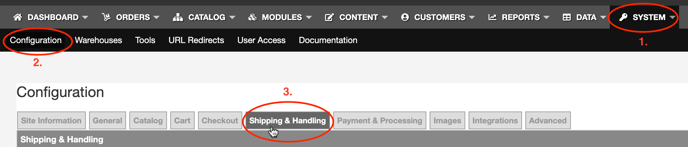
Shipping & Handling form definitions
The table below defines the fields in the Shipping & Handling form and explains their use within the form.
| Shipping & Handling | |
| Default Country | The default field for country selection on the checkout screen. U.S. is the default country. |
| Available Countries | Adds countries available for shipping. When selecting countries outside of the U.S., confirm that you either enabled International Shipping or selected the appropriate method within the the UPS, FedEx, and USPS tabs. |
| Non-Cont. U.S. Remark |
Enables a message to be added for orders shipped to Hawaii or Alaska. This feature is useful to warn customers that displayed shipping amounts are only an estimate. |
| Handling Label | Text that displays when handling charges are used. |
| Handling Percent Charge | For percentage-based handling fees. When used, the charge is added to the Product Handling amount(s) if used. Percentages should be entered in decimal format. |
| Handling Base Charge | For flat-rate handling fees. When used, the charge is added to the Product Handling amount(s) if used. |
| Handling Minimum Charge | Adds a minimum handling amount charged for any order. |
| Quote Shipping |
Available only in the U.S. for oversized products that require truck freight. Additional fields are viewable to adjust settings:
|
| Free Shipping |
Once the Enabled check box is selected, additional fields are viewable to adjust settings:
|
| Basic Shipping |
Allows shipping charges based on a flat rate and/or a percentage of sales and does NOT take into consideration the weight, size or destination of the product(s). Available in the U.S. and U.S. territories. Once the Enabled check box is selected, additional fields are viewable to adjust settings:
|
| Shipping Matrix |
Available in the U.S. and U.S. territories. Once the Enabled check box is selected, additional fields are viewable to adjust settings:
|
| International Shipping |
Allows you to offer set rates for any Non-U.S. shipping addresses and does NOT take into consideration the weight, size, or destination of the product(s). Once the Enabled check box is selected, additional fields are viewable to adjust settings:
|
| Will Call Shipping |
Only available for customers who enter a shipping address from the same state as the merchant site. This feature can be controlled from the Site Information tab. Once the Enabled check box is selected, additional fields are viewable to adjust settings:
|
| UPS Shipping |
UPS is a calculated shipping method that takes into consideration the weight and destination of the product(s). Once the Enabled check box is selected, additional fields are viewable to adjust settings:
For more information about UPS account integration, visit UPS.com. |
| FedEx Shipping |
FedEx is a calculated shipping method that takes into consideration the weight and destination of the product(s). Note: You cannot use FedEx with Web Shop Manager without a FedEx account. Once your account is set up, Contact Us to validate address information. Once the Enabled check box is selected, additional fields are viewable to adjust settings:
For more information about Fedex integration, contact your FedEx representative or visit FedEx Web Services. |
| USPS Shipping |
USPS is a calculated shipping method that takes into consideration the weight, destination of the product(s), and product dimensions. Once the Enabled check box is selected, additional fields are viewable to adjust settings:
Note: USPS requires a WSM Admin user to enable. To enable USPS as a shipping carrier on your site, please submit s Service Desk ticket. For more information about USPS account integration, visit USPS Web Tools API Portal. |
Save Changes
At the bottom of the Shipping & Handling tab, click Save Changes to save any edited shipping and handling information.
💡Tip: Always save changes before navigating to another menu option in Web Shop Manager.
Summary
The Shipping & Handling tab may be the most important part of setting up your configuration. Keep in mind that you can edit your shipping methods at any time to test what combination of free and discounted shipping options increase conversion rates among your customers. When editing shipping methods, always test the checkout experience with a few different products to confirm that your customers are receiving your desired shipping options.